Types are Sets
When learning TS & and | operator make me really confuse about their outcome.
type A = { a: string; shared: number };
type B = { b: string; shared: number };
type Union = keyof (A | B); // shared
type Intersect = keyof (A & B); //  shared | a | b
// It confused me, result should be reversed
Union | = OR
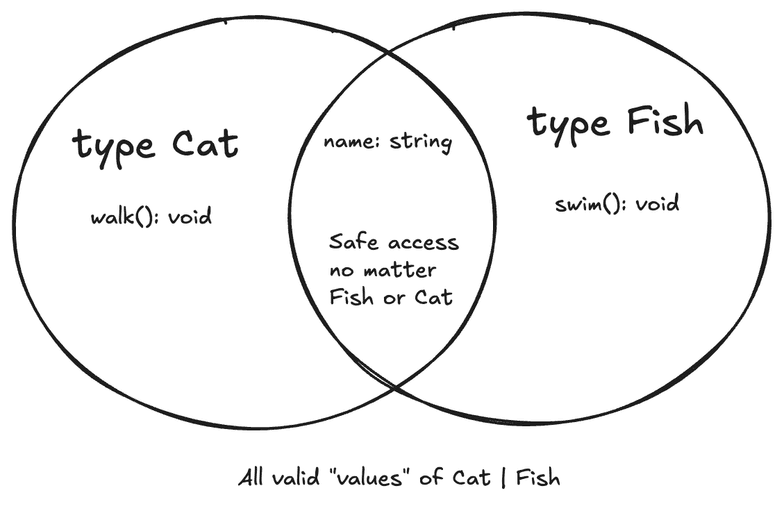
Lets say, I give you a Cat | Fish box, this box can contain a Cat OR
a Fish.
You don't know which one inside (at runtime). TS only lets you do things that work for both.
- Can it
walk()? Nah, If it's a Fish, it will die. - Can it
swim()? Nah, If it's a Cat, it will crash. - Does it have name? Yes, both Cat and Fish have names.
type Cat = {
  name: string;
  run(): void;
};
type Fish = {
  name: string;
  swim(): void;
};
function box(inside: Cat | Fish) {
  inside.name; // Both have names.

  inside.run(); // Nah! What if it's a fish?
  inside.swim(); // Nah! What if it's a cat?
}
The point is: Don't look at properties
, look at the values
.
Union expands set of valid values, but it narrows properties.
Intersection & = AND
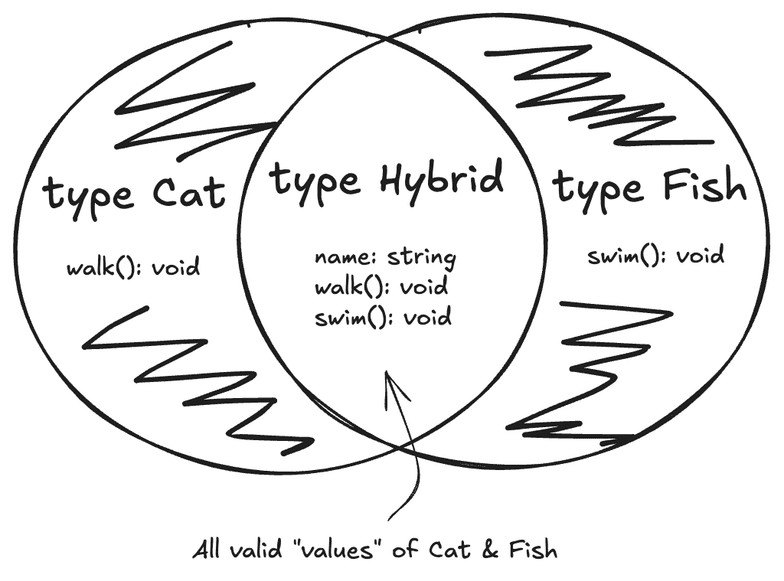
I give you a Cat & Fish box, this box contain a thing is both a Cat AND
a Fish at the same time.
Because it is both, it must have every property from Cat and every property from Fish.
- Can it
walk()? Yes, If it's a Fish. - Can it
swim()? Absolutely, If it's a Cat.
type Hybrid = Cat & Fish;
function box(inside: Hybrid) {
  inside.name; // Yes, my name is Fat.
  inside.run(); // No problem!
  inside.swim(); // Easy!
}
Intersection combines all properties, which mean allowed values are fewer.
unknown > any
unknown is a safe any. It forces to verify the data before using it.
function anyYAML(yaml: any) {
  // Passed compiler check but will crash in run time
  console.log(yaml.toUpperCase());
}

function safeUnknownYAML(yaml: string) {
  // TS yield error 'yaml' is of type 'unknown'
  console.log(yaml.toUpperCase());
  if (typeof yaml === 'string') {
    // TS know yaml is 'string'
    console.log(yaml.toUpperCase());
  }
}

anyYAML(12);
safeUnknownYAML(12);
Iterate Over Objects
In JS this code works perfect, but TS blocks it. Why?
type User = {
  firstName: string;
  lastName: string;
  age: number;
};

function logUser(user: User) {
  for (const k in user) {
    // const k: string;
    console.log(user[k]);
    // Element implicitly has an 'any' type
    // because expression of type 'string' can't be used to index type 'User'
  }
}
Because TS allows Duck Typing
, which mean any object has properties of User will be valid. So k inferred as string makes sense.
const userFromAPI = {
  firstName: 'Vu',
  lastName: 'Nguyen',
  age: 29,
  dob: new Date(),
};
logUser(userFromAPI); //Works fine
There are 2 approachs to fix this:
function logUser(user: User) {
  // Hey Compiler trust me bro,
  // I only want to treat these as known keys
  (Object.keys(user) as Array<keyof User>).forEach((k) => {
    console.log(k); // 'firstName' | 'lastName' | 'age'
    console.log(user[k]); // string | number
  });
}

function logUser(user: User) {
  // Any object will work
  Object.entries(user).forEach(([k, v]) => {
    console.log(k); // string
    console.log(v); // any
  });
}
Declare, Don't Assert
type Example = { prop: string };
const bad = {} as Example;
// Missing 'prop' property, but TS won't warn you.

const good: Example = {};
// Property 'prop' is missing in type '{}'
// but required in type 'Example'.
No Stringly
Typing
Don't use string for finite sets of values, it enables autocomplete, refactoring support, and compile-time error checking.
function setAlignment(align: string) { ... }
// passed TS compiler and there is no autocomplete
setAlignment('centre');

type Alignment = 'left' | 'right' | 'center';
function setAlignment(align: Alignment) { ... }
// Compiler will slap to the face.
// When typing IDE can list all valid values for autocomplete
setAlignment('centre');
Valid State Only
Uses a tagged union (also known as a Discriminated Union
) to explicitly model different type,
that prevent "imposible states".
type Request = {
  status: 'success' | 'error' | 'loading';
  data: string;
  error?: string;
};
// What if status = 'success' and  error = 'failed successfully'?
// What would that mean?

type BetterRequest =
  | { status: 'loading' }
  | { status: 'success'; data: string }
  | { status: 'error'; error: string };

const render = (s: BetterRequest) => {
  if (s.status === 'success') {
    return s.data; // TS knows data exists here
  }
};
Conditional Returns
Function overloads allow you to describe multiple version of input and output, but they often break when passed a union type.
function double(x) {
  return x + x;
}
How to write type declaration for this function?
function double(x: number | string): number | string;

// type of returns are not good, hard to work with
const num = double(10); // num typed as number | string
const str = double('ten'); // str typed as number | string
// Fix the return, more precise
function double<T extends number | string>(x: T): T;
//type of returns are too precise, still not good
const num = double(10); // Type is 12
const str = double('ten'); // Type is 'ten'function double(x: number): number;
function double(x: string): string;
const num = double(12); // Type is number
const str = double('x'); // Type is string
//looks good, but how about this
function f(y: number | string) {
return double(y); // No overload matches this call
}function double<T extends number | string>(
x: T
): T extends string ? string : number;
const num = double(12); // Type is number
const str = double('x'); // Type is string
// finally, TS compiler shut up
function f(y: number | string) {
return double(y); // No overload matches this call
}Don't Repeat Types
Don't copy-paste types. Use Mapped Types [K in keyof T] and Utility types (Pick, Omit, ReturnType) to make new types. If the original type changes, all derived types update automatically.
type Post = {
  id: string;
  slug: string;
  title: string;
  description: string;
  content: string;
};

// Don't repeating fields manually
type NavProps = {
  id: string;
  title: string;
};

// I only want some useful keys for nav
type NavProps = Pick<State, 'title' | 'description'>;

// Same as: { id: string; slug: string; ... }
type PostUpdate = { [K in keyof Post]: Post[K] };
Template Types
Use backticks in types to create string patterns. This allows you to enforce strict formats for CSS strings, URLs, or event names. So type is new string validation at compile time.
type Color = 'color-red' | 'color-blue';
type Intensity = '100' | '200' | '300';

// "color-red-100" | "color-red-200" | "color-blue-100" etc.
type ThemeColor = `${Color}-${Intensity}`;

const myColor: ThemeColor = 'color-red-200'; // Works fine
const wrongColor: ThemeColor = 'color-green-100';
type GetHUE<T extends string> = T extends `color-${infer Hue}-${string}`
? Hue
: never;
type Hue = GetHUE<'color-red-100'>; // Type is "red"type AllowedExtension = `png` | `jp${`e` | ``}g` | `webp`;
type FileName = `${string}.${AllowedExtension}`;
const goodName1: FileName = 'vu.jpeg';
const goodName2: FileName = 'nguyen.jpg';
const badName: FileName = 'dev.json';Branded Types
TypeScript is Duck typing
, which means a string is a string. Sometimes you need to distinguish between a UserId and a PostId (both strings) to prevent mixing them up. You can put a tag on them.
function deleteUser(id: string) {
  /* ... */
}
const postId = 'post-48f8293';
deleteUser(postId); // Works fine, a random user gone
// We add a "fake" tag that doesn't exist at runtime but tricks the compiler.
type UserId = string & { readonly __type: 'UserId' };
type PostId = string & { readonly __type: 'PostId' };
function deleteUser(id: UserId) {
/* ... */
}
const userId = 'user-983710s' as UserId;
const postId = 'post-48f8293' as PostId;
deleteUser(userId); // No problem
deleteUser(postId); // Type 'PostId' is not assignable to type 'UserId'.